Multiply the productivity of every BIM modeler on the team.
Most BIM firms are running a high-skill workforce on workflows that haven't changed in a decade. Project setup is manual. Documentation is manual. QC is manual. Every hour a modeler spends on work that doesn't require judgment is an hour that doesn't compound — it just gets billed and forgotten.
The firms that pull ahead aren't hiring faster. They're automating the repetitive scaffolding so their people can spend time on the work that actually requires expertise.
Six integrated tools. One production environment.
Each module targets a specific bottleneck in BIM production. Together, they form a continuous automation layer from intake through delivery.
Plans2BIM
AI-powered 2D-to-BIM conversion. PDFs and scanned plans into Revit elements.
Design Library Search
Every detail your firm has ever drawn, searchable and reusable in seconds.
Documentation Engine
One-click sheet sets, rule-based dimensioning, automated keynoting, batch export.
QA/QC Automation
Model validation against client BEPs with issues logged in BCF format.
Project Initialization
Grids, levels, worksets, and parameters auto-generated from a standardized intake form.
Speckle Integration
Automated snapshots, client review portals, and production analytics pipelines.
Go from concept to BIM design.
Plans2BIM converts 2D floor plans — client PDFs, scanned drawings, even hand-sketched markups — into native Revit elements using AI. Walls, doors, windows, and slabs are generated automatically, giving your team a working model to refine instead of a blank canvas to build from scratch.
The intake phase is where most BIM projects lose their first block of unbillable hours. Plans2BIM collapses that step from hours into minutes — and eliminates the interpretation errors that cascade through the rest of the project.
Every detail your firm has ever drawn, findable in seconds.
Details accumulate across hundreds of project folders with no central search. When staff leave, their best solutions leave with them. We build searchable, standardized detail libraries — find any detail by keyword, code cycle, or project type and place it directly into your active Revit model.
- Instant retrieval across your entire detail library — under a minute, not hours.
- Institutional knowledge preserved even after staff turnover.
- Vetted firm standards separated from rough starting points.
- Direct Revit integration — search, select, place. No file juggling.
Documentation consumes 35–45% of project hours. Most of it is repeatable.
Our documentation engine automates the mechanical side of sheet production — the work that follows rules, not judgment. It plugs directly into your Revit environment and your firm's specific standards.
- One-click sheet set generation from a project matrix — no manual view placement or title block configuration.
- Rule-based dimensioning calibrated to each client's specific standards, not generic defaults.
- Automated keynoting that pulls from your project libraries and stays synchronized with model changes.
- Batch export across PDF, DWG, and IFC — formatted, named, and organized per deliverable spec.
The goal isn't to remove your documentation team. It's to let them focus on the 20% of documentation work that requires thought instead of the 80% that doesn't.
A second pair of eyes for building codes.
Catch issues before they become liabilities. Our QA/QC automation suite runs custom Revit scripts that validate your model against building codes and client BEP requirements — automatically flagging what needs attention so nothing slips through to submission.
Naming Conventions
Families, views, and sheets validated against client-specific naming rules.
Parameter Completeness
Required parameters checked for presence and valid values across all elements.
Category Assignments
Elements verified against expected category mappings per the BEP.
Model Health Scoring
Aggregate quality metrics — warnings, in-place families, import instances, group nesting.
BCF Issue Logging
Every finding logged in BCF format for structured resolution in Solibri or Navisworks.
Solibri Integration
Layered on top of Solibri for compliance-side validation and clash detection.
Eliminate 4–8 hours of setup and the cascading errors that come with it.
Every new project starts the same way: grids, levels, worksets, view templates, shared coordinates, project parameters. It's tedious, but it's also the foundation everything else builds on. When setup is done manually, small errors in the first hour create compounding problems for the next six months.
Our Project Initialization Toolkit auto-generates the full project scaffold from a standardized intake form. Your BIM manager fills out the form once — building type, grid logic, level structure, coordinate system — and the toolkit builds a clean, standards-compliant Revit file ready for production.
Intake Form
BIM manager fills out a structured form — building type, grid spacing, level names, coordinate basis.
Auto-Generate
Grids, levels, worksets, view templates, shared coordinates, and project parameters created automatically.
Standards Check
Generated scaffold validated against your firm's template standards before handoff.
Production Ready
Clean Revit file delivered to the production team — no manual setup, no inherited errors.
Version control, client access, and production analytics — without leaving Revit.
Speckle gives you the infrastructure for model versioning and data exchange. We build the custom connectors that tie it to your actual production environment — so it works the way your team works, not the way a generic integration assumes.
- Automated model snapshots at project milestones — no manual uploads, no forgotten versions.
- Client review portals that let stakeholders view and comment on models without a Revit license.
- Data pipelines for production analytics — track hours per element, model growth over time, and team throughput across projects.
- API-driven workflows that connect your Revit environment to dashboards, reporting tools, and project management platforms.
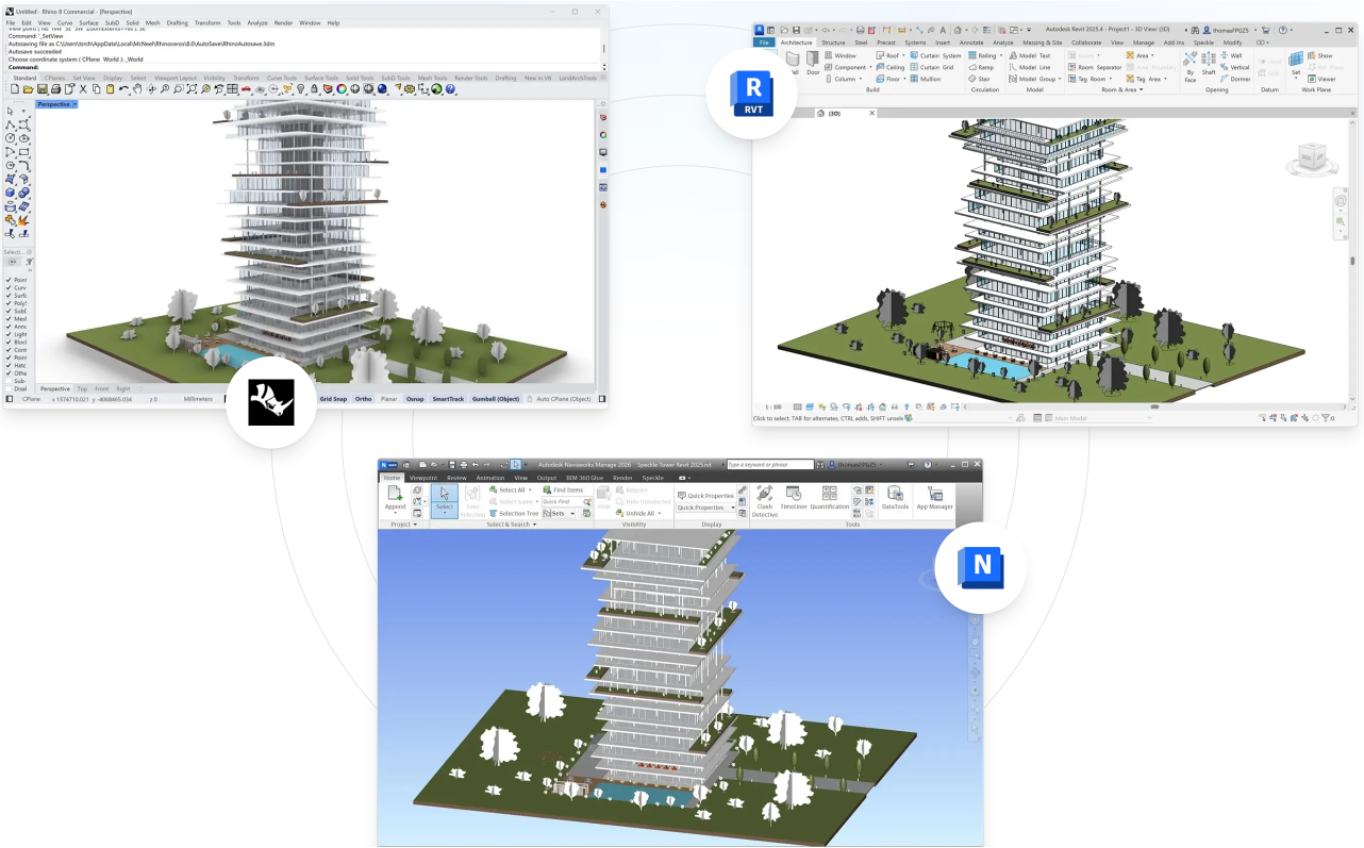
Built for the people who run BIM production.
BIM Managers
- Enforce standards automatically instead of chasing compliance manually after every milestone.
- Project initialization that guarantees a clean starting point — no more inheriting someone else's setup errors.
- Speckle integration gives you version history and production metrics without building the infrastructure yourself.
Production Leads
- Documentation automation frees your team from sheet production grind — they focus on modeling, not formatting.
- Plans2BIM eliminates the intake bottleneck that delays project kickoff by days.
- Searchable design library means your team reuses vetted details instead of redrawing them from scratch every project.
Firm Principals
- Scale output without scaling headcount — automation compounds where labor doesn't.
- QA/QC automation reduces resubmission risk and protects client relationships.
- Production analytics from Speckle integration give you visibility into throughput, not just timesheets.
Custom-built for your environment. Not a product you adapt to.
Audit
We map your current Revit environment, standards, templates, and production bottlenecks.
Prioritize
Identify the highest-ROI automation targets based on hours consumed and error frequency.
Build
Custom tooling deployed directly into your existing Revit environment — no new platforms to learn.
Iterate
Measure production impact, refine workflows, and expand automation based on real data.